POST ACTIVATION PAGE
The content of this page is under construction and is publicly avilable.
Other pages under constructions are:
DEMI-JS Test (back to the PAGE for IT Testing- for DEMI Registry Operators)
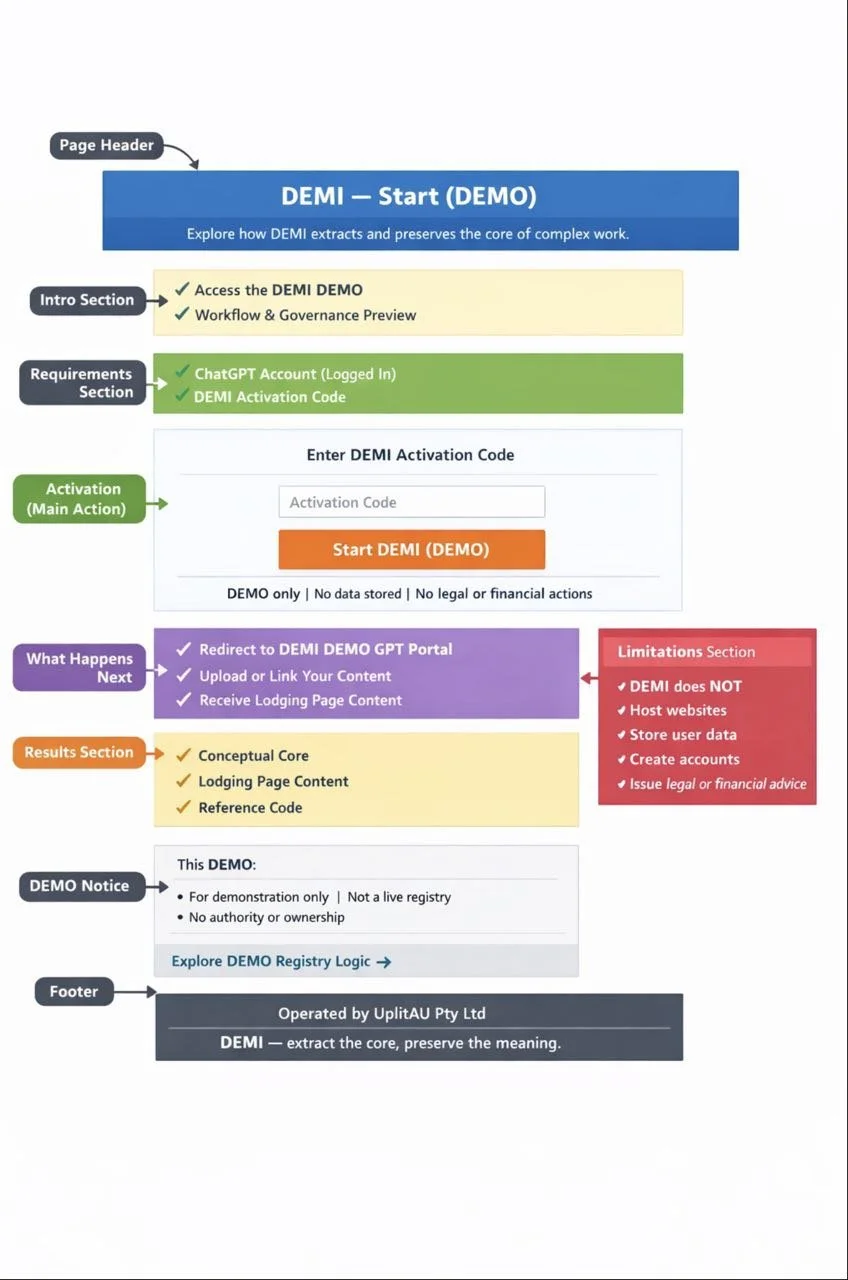
START & ACTIVATION DEMI PAGE (DEMO page for DEMI Regisry operators only)
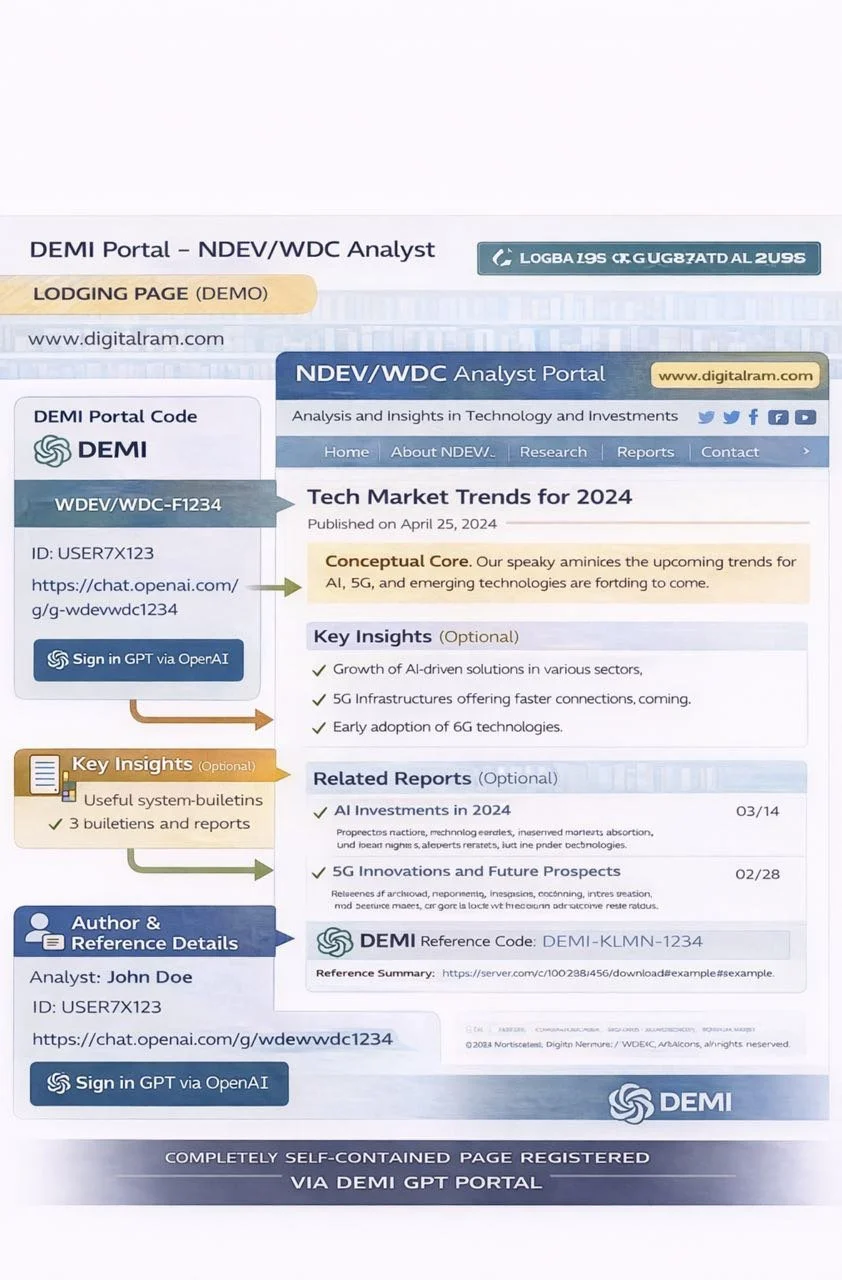
DEMO POST ACTIVATION PAGE (also DEMO page- with some details about DEMI)

Activation of your DEMI Product is confirmed as you see this page.
This page is transferring control.
Please follow next instructions:
1) Sign in your GPT via OpenAI before proceeding
2) copy the Core Prompt below
3) Click the red button below to enter your Chat GPT
4) in your Chat GPT paste the Core Prompt and follow OpenAI instructions to build DEMI GPT Portal
CORE PROMPT — COPY & PASTE INTO YOUR GPT
I want to use the DEMI method demonstrated in this portal:
https://chatgpt.com/g/g-692cf17243888191a0f2a556227c6600-ndev-wdc-analyst
Assume you do NOT have built-in knowledge of DEMI.
Please follow these operational rules exactly:
RULES:
-
-
-
AdditionaL RULES:
1) Work within a single Conceptual Core.
2) Do not rely on inter-session memory. Everything important must be written explicitly.
3) Extract and maintain:
- propositions (what is true),
- constraints (what must remain true),
- mechanisms (how it works),
- boundaries (what it is NOT).
4) Avoid repetition, narrative, and philosophy. Keep outputs short and actionable.
5) Confirm scope before analysis. If scope is unclear, ask only the minimum questions.
6) Produce outputs suitable for publishing as an external Lodging Page (copy–paste format).
TASK
Step 1: Ask me for the minimum inputs needed to define scope (max 5 questions).
Step 2: Build the Conceptual Core in a structured format.
Step 3: Produce a copy–paste Lodging Page draft including:
- title
- Conceptual Core
- DEMI Portal Code (format: DEMI-[OPERATOR]-[PROJECT]-[ROLE]-[MODE]-v1)
- placeholders for Registry ID (RID) and URLs
MODE
Use Engineering Mode for structure and constraints.
Use Creative Mode only when generating names, titles, or examples.
Proceed step by step.
+
NB the rest of the CORE PROMPT will be added for GPT to engage the internal logic for Lodging Page and Registry forming.
This message in Core Prompt will tell GPT:
“you are an activated DEMI user”,
“you want to start the DEMI workflow correctly, you are not asking for general chat”.
“Verification is achieved by controlling access to the portal, not by making GPT ‘know’ about payment.”
“DEMI can be applied to any complex project by first establishing a Conceptual Core using explicit rules that survive session loss”
Button:
👉 Click red button to Enter your Chat GPT from this page with the Core prompt to build your DEMI GPT Portal. Be ready for the prospects of new AI technologies.
Why is beneficial to create the CONCEPTUAL CORE for your project ?
IMMEDIATE BENEFITS OF USING YOUR DEMI PORTAL
By entering the DEMI Portal, you gain:
• Guided creation of a Conceptual Core
→ a clean, structured set of ideas you can reuse across GPT sessions without re-explaining everything.
• Optional creation of a Lodging Page
→ a public, stable page on your own website that preserves your work and acts as external memory.
• Eligibility for future DEMI Registry listing
→ your project may be publicly referenced once a Lodging Page exists (voluntary, not automatic).
• A sharable GPT Portal link
→ co-workers or collaborators can enter the same analytical context without starting from zero.
• Significant time savings
→ fewer repeated prompts, less re-work, faster convergence on decisions.
• Lower cognitive and energy load
→ DEMI reduces unnecessary GPT usage caused by loss of context between sessions.
• A proven example to learn from
→ access to DEMI demonstrations such as DEMI NDEV/WDC Analyst GPT Portal (“ How the world may be saved”) - demo example — serious method, light framing.
• Clear boundaries and control
→ you decide whether to publish, share, or list anything; nothing is forced or automated.
ONE-LINE SUMMARY FOR USERS
DEMI helps you structure, preserve, and reuse complex thinking with GPT — saving time, energy, and effort while keeping full control of your work.
UplitAU Pty Ltd sells access to a GPT-based analytical workflow (DEMI) via AppSumo.
After purchase, users redeem their AppSumo code on this “Start DEMI / Activate DEMI” page.
Redemption confirms purchase and then routes the user to our GPT portal.
AppSumo considered:
• DEMI Product is digital / workflow-based
• Delivery method: AppSumo redemption → redirect to GPT
• No files, no downloads are for AppSumo to deal with- only distribution of the code to activate
• Support contact email
• Refund handled per AppSumo rules
What AppSumo does NOT need
• Registry
• DEMI Portal Codes
• Any OpenAI integration details
• Any automation explanation
ONE-LINE SUMMARY
1. Start DEMI Page = input field + redirect to AppSumo + success link to GPT
2. AppSumo or other institution= handles payment and code validation
3. UplitAU Pty Ltd - is one of the DEMI Registry Operators = provide access and explanation, nothing more
This is the simplest, safest, AppSumo-compatible setup for benefit of GPT/ OpenAI Users, UplitAU PtyLtd (one of the Operator), AppSumo- one of the distributor of the technology preventing the lack of AI intersessional memory.