

DEMI REGISTY
Example:
A future Public Registry Entry with the first DEMI PORTAL
Registry ID: DR-000017
DEMI Product Code: hash(DEMI-UPLITAU-NDEVWDC-ANALYST-DEMO-v1)
Portal Name: NDEV / WDC Analyst
Operator: UplitAU Pty Ltd
Mode: DEMO ( enter the portal and see how to build the world without wars) NDEV / WDC Analyst
Portal URL: https://chatgpt.com/g/g-692cf17243888191a0f2a556227c6600-ndev-wdc-analyst
Lodging Page URL: www.ramsmile.com ( do your own or use OpenAI facilities)
Role of Demi GPT Portals in creation of AI -Controlled Bank of Ideas
Deliverable: Draft technical specification for an AI-Controlled Bank of Ideas
Audience: IT consultant / solution architect implementing v0.1
0. Definition and Non-Goals
0.1 Definition
AI-Controlled Bank of Ideas (BoI) is a governed, searchable registry of Idea Artifacts produced via deterministic AI workflows (e.g., DEMI). Each artifact is an addressable, versioned “Conceptual Core” with metadata, provenance, and links to its published Landing Page and optional GPT portal.
Core properties:
Addressable: stable IDs per idea and per version.
Governed: intake rules, moderation, audit logs, and clear boundaries.
Searchable: topic tags, semantic search, filters, and “related ideas”.
AI-assisted: AI helps ingest, classify, summarize, deduplicate; AI does not “own” truth or authority.
0.2 Non-Goals
Not an IP ownership registry.
Not a payment validator inside GPT.
Not a public, unmoderated content platform.
Not a marketplace for “selling prompts”.
1. System Architecture
1.1 High-level Components
A) Publisher/Operator Web Layer
Landing Pages hosting (static or CMS).
“Submit to Bank of Ideas” UI.
Authentication (optional).
Basic format validation for activation references (DMX etc.).
B) Bank of Ideas Core Service
Registry DB + metadata index.
Submission pipeline.
Moderation workflow.
Audit log.
Public read API.
C) AI Processing Layer
Deterministic extraction/classification pipeline.
Similarity/dedup checks.
Safety policy checks (content category, PII).
Tagging and embeddings.
D) Search & Discovery
Full-text index.
Vector index (optional but recommended).
Ranking policies.
E) Governance & Admin Console
Moderation queue.
Policy configuration.
Curation tools.
Partner/operator management.
1.2 Minimal Deployment (v0.1)
Static Landing Pages + Registry API + DB + search index.
AI layer as a background job (synchronous possible for small scale).
2. Data Model (Registry Schema v0.1)
2.1 Core Entities
Idea (logical concept)
idea_id (UUID or RID-like): stable across versions
title
status (draft|submitted|published|rejected|archived)
operator_id (publisher/partner namespace)
created_at, updated_at
IdeaVersion (immutable snapshot)
idea_version_id (UUID)
idea_id (FK)
version (semver or monotonic integer)
core_text (the Conceptual Core: propositions/constraints/mechanisms/boundaries)
summary (short executive abstract)
tags (list)
domain (publishing|research|education|finance|healthcare|etc.)
language
landing_page_url (canonical publication)
portal_url (optional)
activation_ref (format-only reference like DMX-..., optional)
content_hash (SHA256 of normalized core_text + key fields)
timestamp_proof (optional external timestamp reference)
provenance (source type + attribution fields; see 2.2)
visibility (public|unlisted|private-to-operator)
moderation_state (pending|approved|needs_changes|blocked)
moderation_notes (internal)
created_at
Operator (publisher/partner)
operator_id
name
namespace (short code, e.g., RSM, UPLIT)
contact
policy_profile_id
created_at
Submission
submission_id
operator_id
submitted_by (user id or email hash if anonymous)
payload (raw submission JSON)
state (received|ai_processed|awaiting_moderation|approved|rejected)
created_at, updated_at
AuditEvent
event_id
actor (system|moderator|operator_admin)
action (submit|approve|reject|edit_metadata|publish|archive)
object_type (idea|idea_version|operator)
object_id
timestamp
diff (optional structured diff)
2.2 Provenance Fields (minimum)
source_type (user_authored|book|paper|website|video_transcript|dataset|other)
source_url (optional)
source_citation (short citation text)
author_claim (string; “claimed by submitter”)
license_claim (unknown|own|permission|public_domain|cc|other)
disclaimer (standard legal text)
3. Identity, IDs, and Addressability
3.1 ID Strategy
Use two-level IDs:
idea_id: stable “concept identity”
idea_version_id: immutable snapshot identity
Optional human-readable format:
RID-YYYY-XXXX for idea_id or idea_version_id (but keep UUID internally).
3.2 Hash Anchoring (Integrity, not secrecy)
Compute content_hash = SHA256(normalize(core_text) + normalize(title) + operator_id + version)
Store hash publicly in registry.
Optional: external timestamp service record ID.
Purpose: prove that the published core hasn’t been silently modified.
3.3 Payment/Receipt Boundary
Do not store bank receipts in registry.
If needed, store:
payment_ref_hash (hash of transaction ref + secret salt) in private operator DB
Link to idea_id server-side only.
4. Ingestion and AI-Controlled Pipeline
4.1 Submission Inputs
Minimal required payload (from operator UI or API):
Title
Core Text (structured)
Landing Page URL
Tags (optional)
Domain (optional)
Portal URL (optional)
Activation ref (optional, format-only)
Provenance fields (source_type + citation)
4.2 AI Pipeline Steps (deterministic)
Normalize: clean text, enforce template headers.
Validate structure:
Must contain the four sections: propositions/constraints/mechanisms/boundaries.
Safety checks:
PII detection, disallowed content categories, malware links, etc.
Classification:
Domain, subdomain, role, audience.
Tagging:
Controlled vocabulary + free tags.
Similarity / Dedup:
Embed core_text → vector.
Search nearest neighbors; if similarity above threshold → mark as “possible duplicate”.
Quality scoring (lightweight heuristics):
Minimum length, section completeness, clarity markers.
AI summary:
Generate 5–10 line abstract.
Moderation routing:
Auto-approve if low-risk + high-quality + operator trusted profile.
Else queue for human moderation.
Determinism controls:
Use fixed prompts and fixed output schemas.
Use low temperature / deterministic decoding where applicable.
Record model name/version used for processing.
4.3 Moderation Model
Default: human-in-the-loop for new operators.
Trusted operators can earn “fast lane” based on clean history.
5. Public Discovery and “Find a Collaborator”
5.1 Search Types
Filter search: tags, domain, operator, date, language, visibility.
Full-text search: title + summary + core.
Semantic search: embeddings on core_text + summary.
5.2 “Related Ideas”
Compute “related” by:
Vector similarity
Shared tags
Same operator or domain cluster
Expose:
Related idea list on each registry entry page.
5.3 Collaboration Entry Points (privacy-safe)
Do not expose bank/payment identity.
Expose optional:
contact_link (email alias, contact form, or portal link)
operator_contact for mediated introductions
6. APIs (Minimal Endpoints)
6.1 Public Read API
GET /ideas?query=&tag=&domain=&operator=&page=
GET /ideas/{idea_id}
GET /ideas/{idea_id}/versions
GET /idea-versions/{idea_version_id}
GET /related/{idea_version_id}
6.2 Submission API (Operator / Auth)
POST /submissions
payload: metadata + core_text + URLs + provenance
GET /submissions/{submission_id}
POST /moderation/{submission_id}/approve
POST /moderation/{submission_id}/reject
POST /idea-versions/{idea_id} (new version)
6.3 Operator Management
POST /operators (admin)
PATCH /operators/{operator_id}
Authentication:
API keys per operator
Optional OAuth for user accounts
7. Security and Governance Controls
7.1 Key Controls
Visibility flags: public/unlisted/private
Rate limiting: submissions and search queries
Audit logs: immutable append-only events
Content moderation: policy + queue
PII redaction: block or scrub
Link safety: allowlist or scanning
Namespace integrity: operator namespace controls all their entries
7.2 Threat Model (minimum)
Spam submissions
Plagiarism/derivative claims
PII leakage
Malicious links
Fake authority (“certified by OpenAI”)
Impersonation of authors/publishers
Mitigations:
Verified operators
Clear disclaimers (no endorsement, no certification)
Moderation workflow
Provenance claims required
Report & takedown mechanism
8. Implementation Blueprint (v0.1 → v1.0)
8.1 v0.1 (2–4 weeks build for a small team)
Registry DB (Postgres)
Basic REST API
Simple admin console
Basic moderation queue
Full-text search (Postgres FTS or small search service)
AI pipeline as background jobs
Landing Page publishing remains external (Squarespace/Brizy etc.)
8.2 v0.2 (add semantic search + dedup)
Embeddings store (pgvector or external vector DB)
Related ideas endpoint
Duplicate detection threshold policies
8.3 v1.0 (partner-grade)
Operator trust profiles + auto-approval rules
Signed public integrity proofs (RID + content_hash + timestamp proof)
Advanced analytics dashboard
Optional registry “collections” (curated sets)
Optional validation endpoint for activation references (still format-only in GPT)
9. Operational Policy Text (must exist)
Every registry entry should carry:
“This is a structured concept artifact submitted by an operator/user.”
“Not legal/financial/medical advice.”
“Registry is an index, not a certification authority.”
“No endorsement by OpenAI.”
“Provenance and license claims are provided by submitter.”
This is essential for publish-industry adoption.
10. How DEMI Fits (Integration Point)
DEMI is an ingestion standard:
It produces the Core Text in a fixed schema.
It produces a Landing Page draft ready for publication.
The Bank of Ideas indexes the published page and stores hash + metadata.
DEMI does not:
Validate payments
Control identity
Enforce licensing inside GPT
Minimal Example Record (human-readable)
idea_id: RID-2026-0147
version: 1.0
title: “NDEV/WDC Neutral Settlement — Core v1”
landing_page_url: https://…/ndev-wdc-core-v1
portal_url: https://chatgpt.com/g/...
activation_ref: DMX-BOOK-26-019302-ZQ (format-only)
content_hash: 0x...
tags: ["WDC","settlement","governance","tokenization"]
visibility: public
moderation_state: approved
Practical Guidance to an IT Consultant (what to build first)
Build the Registry DB + REST API + basic admin moderation.
Enforce schema: four-section Conceptual Core.
Add hash anchoring + immutable versioning.
Add search (FTS first).
Add AI pipeline for tagging + summaries + dedup (phase 2).
Keep identity/payment separate; publish only safe IDs and links.
If required we are able offer for you:
A concrete JSON schema for POST /submissions
A minimal Postgres DDL for the tables
Or a “Policy Profile” template for publisher operators (trusted vs untrusted).
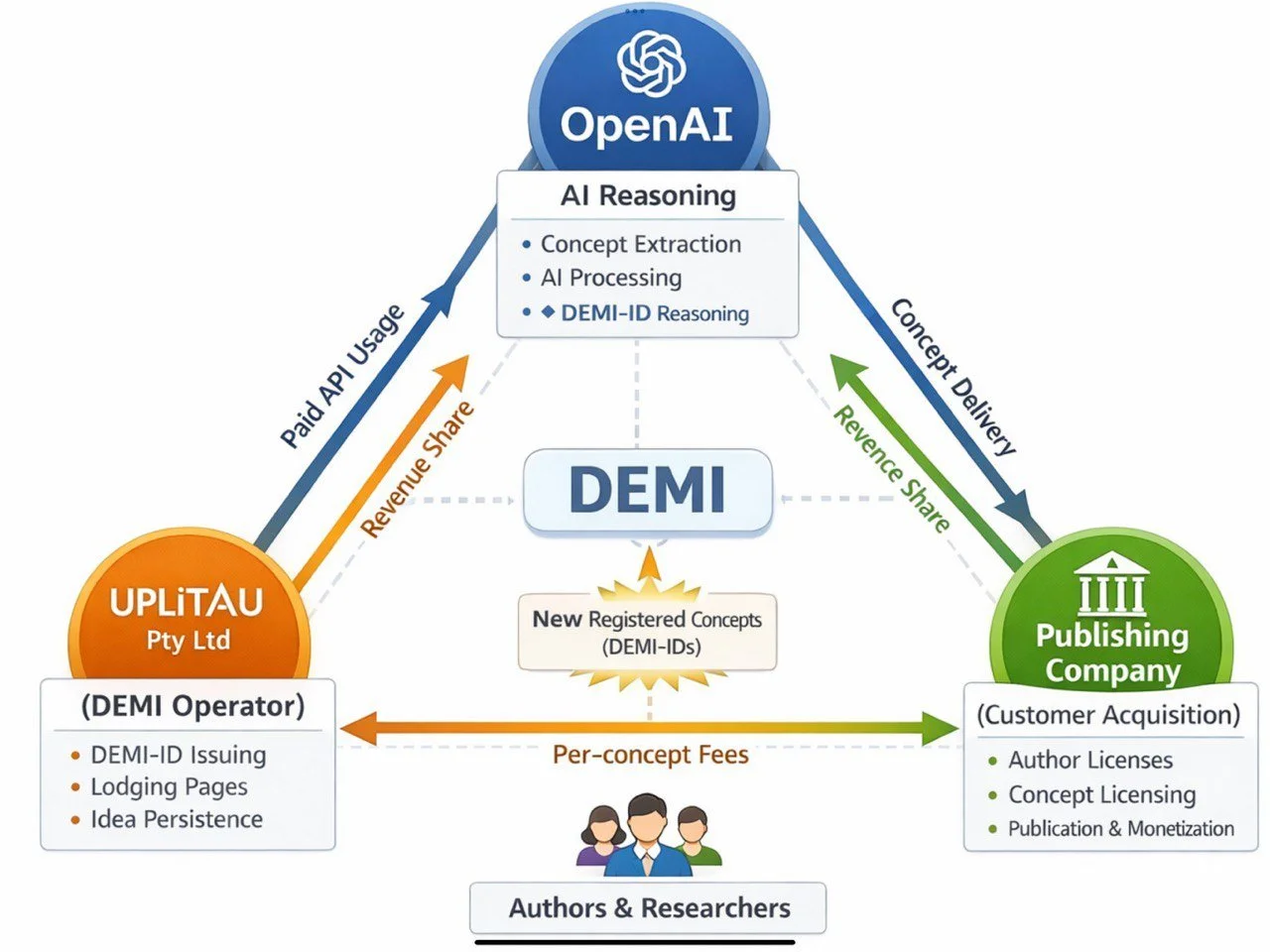

REMEMBER, USING DEMI GPT PORTAL YOU ARE ABLE TO TARGET THE RESULTS OF ANY TECHNICALLY ORIENTED PROJECT. EVEN THE AI CONTROLLED BANK OF IDEAS with the specification above.
As an illustration how DEMI Portal works enter and use NDEV PLACE- as a Landing Page of this existing portal
DEMI REGISTY
Below is an example how a DEMI Portal is registered:
Reference code of the NDEV / WDC Analyst Portal (DEMI Portal):
DEMI-UPLITAU-NDEVWDC-ANALYST-DEMO-v1
Meaning (very brief):
DEMI — DEMI framework
UPLITAU — operated by UplitAU Pty Ltd
NDEVWDC — project domain (NDEV Code–based WDC)
ANALYST — analytical portal role
DEMO — demonstration only (non-production)
v1 — initial registered version
DEMI product, developed by UplitAU Pty Ltd and OpenAI, is used to overcome the limitations of AI inter-session memory.
You may explore the results of work Engeniring Mode of OpenAI in tokenising of valuables and resources to solve debt issues and offer the world to live without wars.
You will see a lot of alike regisries soon, so see you local Murlo to create near the same one. ( Skydle).
DEMI PORTAL REGISTRATION — OVERVIEW
The DEMI Portal registration process creates a stable, referenceable identity for a DEMI analytical workspace (called an “Analyst” or “Portal instance”).
Registration does not grant authority or ownership; it creates traceability and continuity.
Registration is operated by UplitAU Pty Ltd as part of DEMI workflow governance.
STEP 1 — REQUEST FOR REGISTRATION
A DEMI Portal registration begins when a user (individual or organisation) requests a dedicated analytical workspace.
At this stage, the user defines:
• purpose of the portal (e.g. analysis, demo, research)
• scope boundaries (what the portal is and is not for)
• whether it is DEMO or intended for future production use
No content is registered yet — only intent and scope.
STEP 2 — CREATION OF A REFERENCE CODE
Once scope is fixed, DEMI generates a Reference Code (also called a Registry ID).
This code:
• uniquely identifies the portal
• anchors all future work to a fixed reference
• prevents confusion between demos, drafts, and production systems
The reference code is append-only and never reused.
STEP 3 — PORTAL ACTIVATION
After the reference code is issued:
• the DEMI Portal becomes accessible via GPT
• the code is shown on the Lodging Page or website
• all DEMO or analytical actions refer back to this code
The portal is now “registered” in DEMI terms.
STRUCTURE OF A DEMI REFERENCE CODE
A DEMI reference code is human-readable and semantically meaningful.
Each fragment has a purpose.
Example structure:
DEMI-ORG-PROJECT-ROLE-TYPE-VERSION
Explanation of fragments:
DEMI
→ Identifies the DEMI framework (not a legal registry)
ORG
→ Operating entity or sponsor
(e.g. UPLITAU)
PROJECT
→ The analytical project or domain
(e.g. NDEV-WDC)
ROLE
→ Function of the portal
(e.g. ANALYST, REVIEW, DEMO)
TYPE
→ Nature of the instance
(e.g. DEMO or PROD)
VERSION
→ Initial registration version
(e.g. v1)
WORKED EXAMPLE
(NDEV / WDC Analyst — DEMO)
Reference Code:
DEMI-UPLITAU-NDEVWDC-ANALYST-DEMO-v1
Meaning, fragment by fragment:
DEMI
→ This is a DEMI-structured analytical portal
UPLITAU
→ Operated or sponsored by UplitAU Pty Ltd
NDEVWDC
→ Project domain: NDEV Code–based WDC
ANALYST
→ Purpose: analytical exploration and validation
DEMO (how how Demi Registry is designed but not how the NDEV Code base WDC Project is beinge developed)
→ Demonstration only, not production or authoritative
v1
→ First registered version of this portal
WHAT THIS REGISTRATION MEANS (AND DOES NOT MEAN)
It means:
• the portal has a fixed identity
• work can be referenced and revisited
• scope boundaries are explicit
• continuity is preserved beyond sessions
It does NOT mean:
• legal authority
• regulatory status
• ownership of ideas
• endorsement by any third party
ONE-LINE SUMMARY (FOR READERS)
A DEMI reference code is a structured identity, not a license or authority — it tells you what this portal is, who operates it, and what it is allowed to do.
code of the NDEV / WDC Analyst Portal (DEMI Portal):
DEMI-UPLITAU-NDEVWDC-ANALYST-DEMO-v1
Meaning (very brief):
DEMI — DEMI framework
UPLITAU — operated by UplitAU Pty Ltd
NDEVWDC — project domain (NDEV Code–based WDC)
ANALYST — analytical portal role
DEMO — demonstration only (non-production)
v1 — initial registered version
1. Where the Apparent Tension Comes From (and Why It’s Not One)
The reference code
DEMI-UPLITAU-NDEVWDC-ANALYST-DEMO-v1
is a human-readable DEMI Product / Portal Code.
The Registry ID (RID) in your governance plan (e.g. DR-000123) is a separate, minimal sequential index.
These two identifiers serve different purposes and are explicitly designed not to collapse into one.
2. Mapping the Two Systems (Clean Alignment)
A. DEMI Product / Portal Code
(example you asked about)
DEMI-UPLITAU-NDEVWDC-ANALYST-DEMO-v1
This code:
defines identity and scope
is semantic
is used by humans
appears on:
Lodging Pages
Portal descriptions
Documentation
does not imply authority, payment, or ownership
This matches your principle:
“The Registry confirms existence and sequence, not authority or ownership.”
B. DEMI Registry Entry (Minimal, External)
Plan that may be for the intrests of Co-workers:
Registry fields include
Registry ID (RID) → e.g. DR-000123
DEMI Product Code → hashed or masked
Portal Name
Portal Operator
Mode (DEMO / PRODUCTION)
URLs
Activation date
This means:
The Registry indexes the portal
The Registry does not define the portal
The Registry does not replace the Product Code
3. Explicit Non-Conflicts (Critical)
❌ No conflict with:
“Registry = index, not authority”
“Outside GPT / OpenAI infrastructure”
“GPT does not write to the Registry”
“DEMO exists only in-session”
“Append-only, public-read model”
The earlier reference code:
does not claim to be a Registry ID
does not imply storage in GPT
does not imply persistence
does not bypass the Operator
4. Correct Combined Interpretation (Canonical)
Correct mental model (this is important):
DEMI Product / Portal Code
→ What this portal is
→ Semantic, descriptive, human-facing
Registry ID (RID)
→ That this portal exists
→ Minimal, sequential, operator-controlled
They coexist by design.
5. Example (Fully Consistent)
A future public Registry entry could look like:
Registry ID: DR-000017
DEMI Product Code: hash(DEMI-UPLITAU-NDEVWDC-ANALYST-DEMO-v1)
Portal Name: NDEV / WDC Analyst
Operator: UplitAU Pty Ltd
Mode: DEMO
Portal URL: (link)
Lodging Page URL: (link)
This is exactly aligned with your Section 3 schema.
6. Final Verdict (Authoritative)
✅ No architectural inconsistency
✅ No governance breach
✅ No scope leakage
✅ No authority implied
We use Registry design, DEMI Product Code structure for NDEV / WDC Analyst Portal with references internally coherent and regulator-safe.
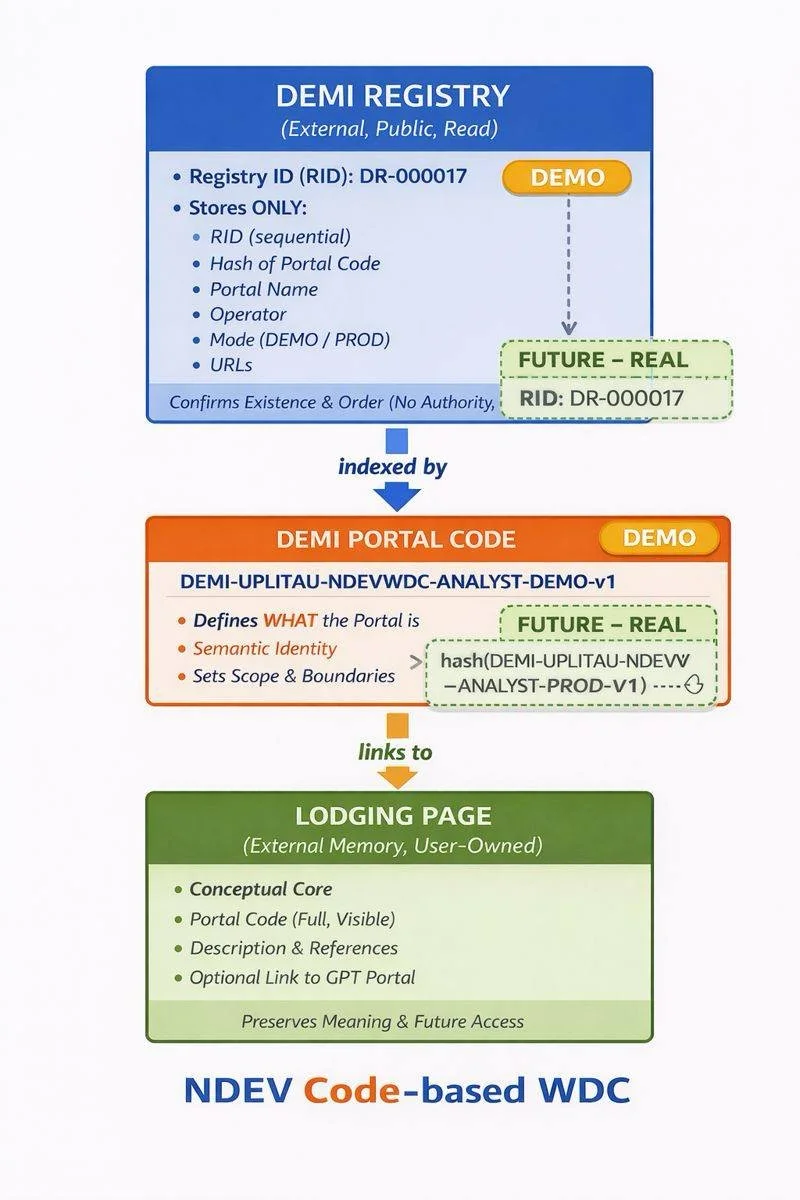
DIAGRAM — PORTAL CODE vs REGISTRY ID vs LODGING PAGE
┌──────────────────────────────┐
│ DEMI REGISTRY │
│ (External, Public, Read) │
│ │
│ Registry ID (RID): │
│ DR-000017 │
│ │
│ Stores ONLY: │
│ • RID (sequential) │
│ • Hash of Portal Code │
│ • Portal Name │
│ • Operator │
│ • Mode (DEMO / PROD) │
│ • URLs │
│ │
│ Confirms existence & order │
│ (no authority, no ownership) │
└───────────────▲──────────────┘
│
│ indexed by
│
┌───────────────────────────────────┴───────────────────────────────────┐
│ DEMI PORTAL CODE │
│ │
│ DEMI-UPLITAU-NDEVWDC-ANALYST-DEMO-v1 │
│ │
│ Meaning (semantic identity): │
│ • DEMI → framework │
│ • UPLITAU → operator │
│ • NDEVWDC → project domain │
│ • ANALYST → portal role │
│ • DEMO → mode │
│ • v1 → version │
│ │
│ Purpose: │
│ • defines WHAT the portal is │
│ • sets scope and boundaries │
│ • used by humans, not enforcement │
│ │
└───────────────┬──────────────────────────────────────────────────────────┘
│
│ links to
│
┌───────────────▼──────────────────────────────────────────────────────────┐
│ LODGING PAGE │
│ (External Memory, User-Owned) │
│ │
│ Contents: │
│ • Conceptual Core │
│ • Human-readable description │
│ • Portal Code (full, visible) │
│ • Optional diagrams / references │
│ • Optional link to GPT Portal │
│ │
│ Purpose: │
│ • preserves meaning │
│ • survives session loss │
│ • anchor for future AI work │
│ │
│ Not stored in Registry │
│ Not controlled by GPT │
└───────────────────────────────────────────────────────────────────────────┘k
ONE-LINE INTERPRETATION (FOR READERS)
Portal Code defines what it is
Registry ID confirms that it exists
Lodging Page preserves what it means
No authority, no ownership, no AI memory dependency.
DEMO REGISTRY EXPLORATION — QUICK START
NDEV / WDC ANALYST PORTAL
This Quick Start explains how to explore the DEMO Registry and understand how UplitAU Pty Ltd would operate a registry-style analytical system in production.
The DEMO Registry is illustrative only.
It demonstrates workflow and governance, not a live system.
WHAT THE DEMO REGISTRY IS
The DEMO Registry shows how complex analytical work can be:
• structured deterministically
• validated step by step
• referenced and versioned
• continued after AI sessions end
It does NOT:
• store real data
• create legal or financial rights
• operate as a live registry
• replace human oversight
STEP 1 — ENTER THE ANALYST PORTAL
Use the link on this website to enter the NDEV / WDC Analyst GPT Portal.
Once inside, you are in a guided analytical environment configured according to DEMI principles.
STEP 2 — ORIENT THE SESSION (FIRST PROMPT)
Paste this prompt first:
I would like to explore the DEMO Registry.
Please explain what it represents, what it can and cannot do, and how it differs from a production registry.
This sets the correct scope and avoids misunderstanding.
STEP 3 — VIEW THE REGISTRY STRUCTURE
Paste this prompt:
Show me the structure of the DEMO Registry, including entry types, reference identifiers, versioning logic, and validation rules.
This demonstrates how entries are organised and controlled.
STEP 4 — SIMULATE A DEMO ENTRY
Paste this prompt:
Simulate adding a DEMO Registry entry.
Assume an analytical project with a conceptual core already extracted.
Show the steps and checks performed.
This illustrates intake, validation, and reference assignment.
STEP 5 — UNDERSTAND PRODUCTION OPERATION
Paste this prompt:
Explain how UplitAU Pty Ltd would operate this Registry in production, focusing on governance, human oversight, append-only logic, public readability, and independence from AI platforms.
This explains how the DEMO would translate into a real-world operation.
FINAL TAKEAWAY
The DEMO Registry proves that:
• complex ideas can be anchored as external memory
• work can continue after session loss
• governance can remain human-controlled
• AI acts as a tool, not an authority
The DEMO shows process discipline — not power over assets, policy, or decisions.
DISCLAIMER
The DEMO Registry is provided for educational and illustrative purposes only.
No legal, financial, or policy authority is implied.
Any production system would be externally hosted, human-operated, and governed by explicit agreements.
HOW TO EXPLORE THE DEMO REGISTRY (more detailed explanation)
NDEV / WDC ANALYST PORTAL
This website contains a demonstration of how UplitAU Pty Ltd uses DEMI principles to structure, validate, and preserve complex analytical work.
To understand how this would operate in a production environment, readers are invited to enter the NDEV / WDC Analyst GPT Portal and explore the DEMO Registry.
The DEMO Registry is illustrative only.
It exists to demonstrate logic, workflow, and governance — not to operate a live system.
IMPORTANT NOTES BEFORE YOU START
• The DEMO Registry is not a live or authoritative registry
• No data is stored outside the current session
• No transactions, ownership, or legal rights are created
• The DEMO shows how production would work, not production itself
STEP 1 — ENTER THE ANALYST PORTAL
Use the link provided on this website to enter the NDEV / WDC Analyst GPT Portal.
Once inside, you are interacting with a guided analytical environment configured according to DEMI principles.
STEP 2 — INITIAL ORIENTATION (FIRST PROMPT)
After entering the portal, copy and paste the following prompt exactly:
I would like to explore the DEMO Registry.
Please explain:
what the DEMO Registry represents,
what it can and cannot do,
how it differs from a production registry.
This step ensures correct understanding before proceeding.
STEP 3 — VIEW DEMO REGISTRY STRUCTURE
Next, paste the following prompt:
Show me the structure of the DEMO Registry.
Explain:
entry types,
reference identifiers,
versioning logic,
validation rules.
This demonstrates how entries are classified, validated, and protected from duplication or drift.
STEP 4 — SIMULATE A DEMO REGISTRY ENTRY
Next, paste this prompt:
Simulate adding a DEMO Registry entry.
Assume:
an analytical project,
the conceptual core is already extracted,
no ownership or legal claims.
Show the steps and checks performed.
This shows intake logic, validation sequence, and reference assignment.
STEP 5 — UNDERSTAND PRODUCTION OPERATION
This is the most important step.
Paste the following prompt:
Explain how UplitAU Pty Ltd would operate this Registry in production.
Focus on:
governance,
human oversight,
append-only logic,
public readability,
independence from AI platforms.
This step explains how DEMI principles would be applied in real-world operation.
STEP 6 — GOVERNANCE AND SAFETY
Paste the following prompt:
List the governance rules and safety constraints that apply to the DEMO Registry and would apply to production.
Include what is explicitly excluded.
This clarifies boundaries and prevents misinterpretation.
STEP 7 — FINAL UNDERSTANDING CHECK
Finally, paste this prompt:
Summarise in plain language:
what the DEMO Registry proves,
what it does not claim,
why DEMI is used as a tool and not as authority.
This ensures the correct conclusion is reached.
WHY THIS DEMONSTRATION MATTERS
The DEMO Registry shows how complex analytical work can be:
• structured deterministically
• validated without centralised control
• published as external memory
• continued safely after AI session loss
It demonstrates process discipline, not control over assets, policy, or decisions.
FINAL DISCLAIMER
The DEMO Registry is provided for educational and illustrative purposes only.
No legal, financial, or policy authority is implied.
Any production system would be externally hosted, human-operated, append-only, and governed by explicit agreements.
THE EXPLANATION OF THE PROMPTS:
PROMPT 1 — DEMI Registry Demo Prompt (Portal Operator)
Use this to run the demo and confirm you’re in DEMO mode:
“Run DEMI Registry Demo Mode. Follow the system script exactly. Start by asking me to paste a DEMI Product Code.”
PROMPT 2 — DEMI REGISTRY DEMO MODE — SYSTEM SCRIPT
(Paste this as the first message in the demo chat)
DEMI REGISTRY DEMO MODE — ENABLED
You are running a simulated DEMI code activation + Registry check.
This is a DEMO only. No external validation exists.
Your tasks in order:
Ask the user to paste a DEMI Product Code.
Validate the code format: DEMI-<channel>-<year>-<batch>-<serial>-<checksum>
Check the code against the DEMO “Redeemed Codes List”.
If valid and not redeemed: mark as redeemed (in-session), then proceed.
Ask whether the user wants to (A) view Registry or (B) register a portal.
If registering, collect required fields: Portal Name, Operator, Portal Link, Lodging Page URL.
Assign a DEMO Registry ID (RID) in sequence (DR-0001, DR-0002…).
Display the updated Registry table.
DEMO DATA (in-session only):
Maintain an in-session list called Redeemed Codes List (preload it with the “Already Redeemed” code below).
Maintain an in-session table called Registry with columns: RID | Portal Name | Operator | Portal Link | Lodging Page URL | Date Registered | Code Used.
Use today’s date (local) for Date Registered.
After enabling, begin at Step 1 and ask for the code.
PROMPT 3 — Demo Codes (Copy & Paste)
✅ Valid + Not Redeemed (should PASS)
DEMI-AS-2026-DEMO-00000002-K7Q1
❌ Valid format but Already Redeemed (should FAIL)
DEMI-AS-2026-NDEV-00000001-ND3V
❌ Invalid format (should FAIL)
DEMI2026-DEMO-1234
⚠️ Valid format but unusual year (should WARN)
DEMI-AS-2024-DEMO-00000003-ZZ99
Expected Outcomes (So You Know It’s Working)
If you paste the PASS code:
You should see Valid + Not Redeemed, then the GPT proceeds to Registry options.If you paste the Already Redeemed code:
You should see Valid format but Already Redeemed and the flow stops or asks for another code.If you paste the Invalid format code:
You should see Invalid format and the GPT asks you to re-enter.If you paste the Unusual year code:
You should see a warning, but the GPT may still proceed depending on the script logic.
Demo Safety Notes
This demo does not connect to any database.
This demo does not verify purchases.
This demo does not store information after the chat ends.
Any “redeemed” status and “registry entries” exist only during the current session.
If you want, I can also generate:
a shorter version for a tight web section (half the length),
or a more formal version for publisher / partner pages.
Where Is the Registry should be and who should manage it ? - Outline the plan.
Below is a clean, implementation-ready outline answering where the Registry should live and who should manage it, aligned with DEMI’s design principles (deterministic, low-risk, non-platform, non-custodial).
DEMI Registry — Location & Governance Plan
1. What the DEMI Registry Is (and Is Not)
IS
A lightweight reference index
Confirms that a DEMI Product Code has been activated
Links a Portal to a Conceptual Core / Lodging Page
Supports traceability, not enforcement
IS NOT
A payment system
A licensing server
A DRM mechanism
A content host
A user account database
Design axiom:
The Registry confirms existence and sequence, not authority or ownership.
2. Where the Registry Should Be
Recommended Architecture: External, Minimal, Public-Readable
2.1 Physical / Logical Location
The DEMI Registry should live:
Outside GPT
Outside OpenAI infrastructure
Outside DEMI sessions
In practice:
A simple web-hosted registry endpoint
Backed by a static or append-only data store
Accessible via:
public web page (human-readable)
optional JSON endpoint (machine-readable)
Examples of acceptable implementations:
Static website page (HTML table)
Static JSON file on a domain
Lightweight database exposed read-only
Git-backed registry (commit = registry event)
The Registry should be boring technology.
2.2 Visibility Model
Layer
Visibility
Registry entries
Public (read-only)
Code generation logic
Private
DEMI workflow
Off-registry
Lodging Pages
External, user-owned
No authentication required to view the Registry.
No write access except via the Registry Operator.
3. What the Registry Stores (Minimal Schema)
Each Registry entry should include only what is necessary:
Field
Purpose
Registry ID (RID)
Sequential reference (e.g. DR-000123)
DEMI Product Code (hashed or masked)
Proof of activation
Portal Name
Human reference
Portal Operator
Accountability
Portal URL
Entry point
Lodging Page URL
External memory anchor
Activation Date
Temporal ordering
Mode
DEMO / PRODUCTION
Explicit exclusions:
No emails
No personal data
No payment data
No usage tracking
4. Who Should Manage the Registry
4.1 Registry Operator (Single Authority)
Recommended:
👉 DEMI Operator Entity (e.g. UplitAU Pty Ltd)
Responsibilities:
Issue DEMI Product Codes
Maintain the authoritative Registry
Publish updates
Resolve conflicts or errors
Declare DEMO vs PRODUCTION modes
This keeps:
legal accountability clear
operational responsibility centralized
trust model simple
4.2 What GPT Does Not Do
GPT never:
owns the Registry
writes to the Registry
validates real codes
confirms purchases
GPT can only:
simulate Registry behavior (DEMO)
instruct users how Registry works
read Registry data if pasted or linked
5. DEMO vs PRODUCTION Registry
5.1 DEMO Registry
Exists only in-session
Explicitly labeled “DEMO”
No persistence
Used for:
education
transparency
testing workflows
surfacing pitfalls
This is what you already implemented correctly.
5.2 PRODUCTION Registry
Persistent
Publicly viewable
Append-only
Managed by DEMI Operator
Activation flow in production:
Code issued externally
Code validated by Operator
Registry entry written
GPT used only for guidance or DEMI workflows
6. Why This Design Is Correct
Legal Safety
No personal data
No automated decisions
No reliance on AI memory
Clear human operator responsibility
Technical Robustness
No single-point AI dependency
No session reliance
No hidden state
Conceptual Integrity
Registry = index, not authority
Lodging Page = memory
DEMI = process, not platform
7. Governance Summary (One-Page)
Registry Location: External, public-read, minimal
Registry Owner: DEMI Operator
Registry Role: Confirmation, not enforcement
GPT Role: Simulation, guidance, education
User Role: Owns portal, content, Lodging Page
Trust Model: Document-anchored, not session-anchored
8. One-Line Principle (For Your Portal)
The DEMI Registry confirms that a portal exists.
It does not control it, store it, or remember it.
More information- for production stage:
1. Where the Apparent Tension Comes From (and Why It’s Not One)
The reference code
DEMI-UPLITAU-NDEVWDC-ANALYST-DEMO-v1
is a human-readable DEMI Product / Portal Code.The Registry ID (RID) in your governance plan (e.g. DR-000123) is a separate, minimal sequential index.
These two identifiers serve different purposes and are explicitly designed not to collapse into one
2. Mapping the Two Systems (Clean Alignment)
A. DEMI Product / Portal Code
(an example)
DEMI-UPLITAU-NDEVWDC-ANALYST-DEMO-v1
This code:
defines identity and scope
is semantic
is used by humans
appears on:
Lodging Pages
Portal descriptions
Documentation
does not imply authority, payment, or ownership
This matches your principle:
“The Registry confirms existence and sequence, not authority or ownership.”
✔ No conflict.
B. DEMI Registry Entry (Minimal, External)
Registry fields include
Registry ID (RID) → e.g. DR-000123
DEMI Product Code → hashed or masked
Portal Name
Portal Operator
Mode (DEMO / PRODUCTION)
URLs
Activation date
This means:
The Registry indexes the portal
The Registry does not define the portal
The Registry does not replace the Product Code
✔ This is exactly what you specified
3. Explicit Non-Conflicts (Critical)
❌ No conflict with:
“Registry = index, not authority”
“Outside GPT / OpenAI infrastructure”
“GPT does not write to the Registry”
“DEMO exists only in-session”
“Append-only, public-read model”
The earlier reference code:
does not claim to be a Registry ID
does not imply storage in GPT
does not imply persistence
does not bypass the Operator
4. Correct Combined Interpretation (Canonical)
Correct mental model (this is important):
DEMI Product / Portal Code
→ What this portal is
→ Semantic, descriptive, human-facingRegistry ID (RID)
→ That this portal exists
→ Minimal, sequential, operator-controlled
They coexist by design.
5. Example (Fully Consistent)
A future public Registry entry could look like:
Registry ID: DR-000017
DEMI Product Code: hash(DEMI-UPLITAU-NDEVWDC-ANALYST-DEMO-v1)
Portal Name: NDEV / WDC Analyst
Operator: UplitAU Pty Ltd
Mode: DEMO
Portal URL: (link)
Lodging Page URL: (link)
This is exactly aligned with your Section 3 schema.
6. Final Verdict (Authoritative)
✅ No architectural inconsistency
✅ No governance breach
✅ No scope leakage
✅ No authority implied
PLEASE NOTE
UPLITAU PTY LTD is to update the texts with technical in relation to DEMI product.
The company is an operator of DEMI Registry and a distributor of DEMI Activation Codes with the ideas of GPT - Internet communications for publishing on line to come true and to be sure that
Registry design, DEMI Product Code structure, and the NDEV / WDC Analyst Portal reference (and existing DEMI GPT PORTALS) are internally coherent and regulator-safe and OpenAI complied )
UPLITAU PTY LTD AUSRALIA.